Convert Horizontal Video to Vertical 9:16
A clip from YouTube, a camera or a screen recording can become a vertical video for Reels, TikTok and Shorts. The bot converts the frame to 9:16 in one of three ways — pick the one that suits your video.
Three ways to make a video vertical
| Method | Pros | Cons |
|---|---|---|
| Blurred background | The whole original image is visible, and the margins aren't empty — they follow the motion of the video | The video itself takes up a band in the middle |
| Crop the edges | The frame is completely filled | You lose the edges: people at the sides, text, details |
| Black bars | Clean and cinematic; you can put your own text in the bars | Empty strips at the top and bottom |
If there are several people, captions or a software interface in the frame, go with the blurred background. If there's one person standing in the center, crop.
How it looks in the mini app
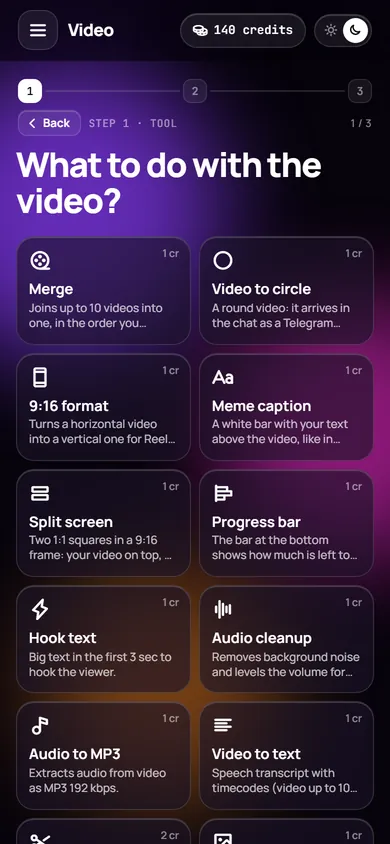
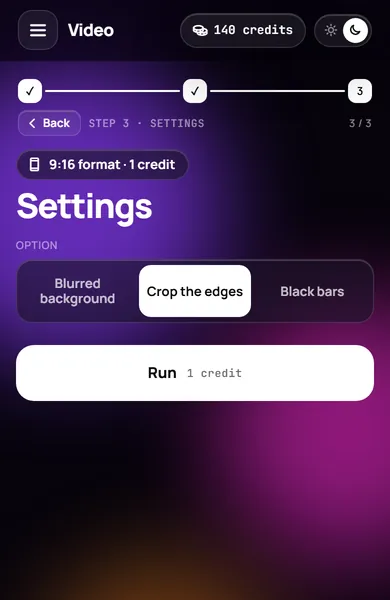
How to convert a video to vertical format
- Open the bot in Telegram and, in the mini app, go to "Video" → "9:16 format".
- Upload your horizontal video.
- Choose a method: "Blurred background", "Crop the edges" or "Black bars".
- Tap "Run". The finished 1080×1920 vertical video arrives in the chat.
Word-by-word captions are easy to add with auto-editing — it also delivers vertical video. And if you're reposting a clip that was made for another platform, uniquifying will come in handy.
Where horizontal videos come from
- YouTube videos, webinars, screen recordings — all shot in 16:9.
- Footage from cameras and action cams that record horizontally.
- Old phone videos shot sideways.
If the source is long, first cut it into short pieces with the "Split" tool, then convert the pieces you need to vertical.
FAQ
Can I do the opposite — make a vertical video horizontal?
This tool converts video to 9:16, the short-video format. To build a horizontal 16:9 video from several clips, use Merge.
What resolution will the result be?
A 1080×1920 vertical video — suitable for Reels, TikTok and Shorts with no loss of quality.
Will the sound be kept?
Yes, the sound stays exactly as in the original video.
How much does it cost?
1 credit per video. You can try the bot for free: your first edit (with a UNIQ watermark) and first uniquified video are free.