YouTube Shorts Editing
Shorts are the fastest way to bring new viewers to a YouTube channel. The bot turns your recording into a Short: it cuts pauses and bad takes, adds a hook and captions, and drops in inserts and sounds. All that's left is to upload the finished vertical video to YouTube.
What the bot does with your Short
- Removes pauses and bad takes — tight videos without a second of silence win on Shorts.
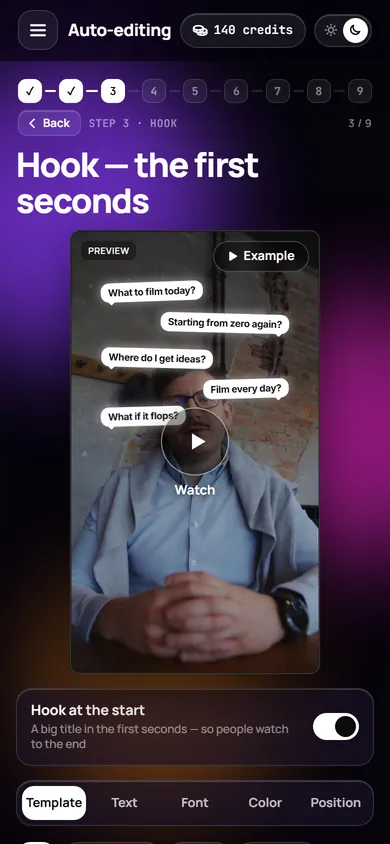
- Adds a hook. The first 1–2 seconds decide whether a viewer swipes away or stays. Your first line appears large on screen.
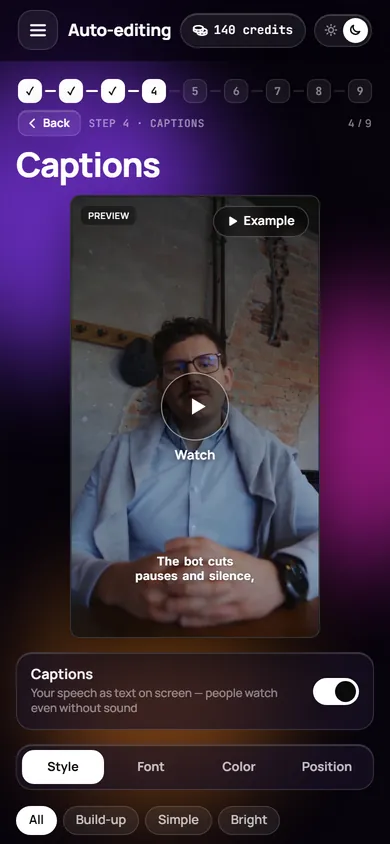
- Adds captions word by word — the video makes sense on mute, and key words are highlighted.
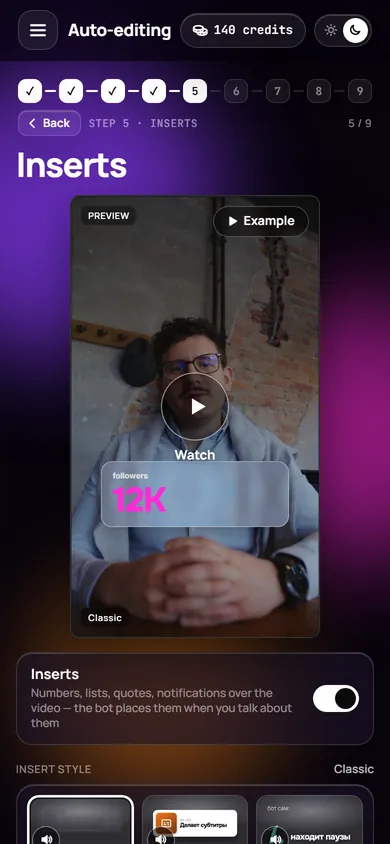
- Adds inserts: counters, lists, a "Subscribe" badge, your own screenshots and photos — right where you talk about them.
- Transitions, zooms and sounds — so the video doesn't look like one static recording.
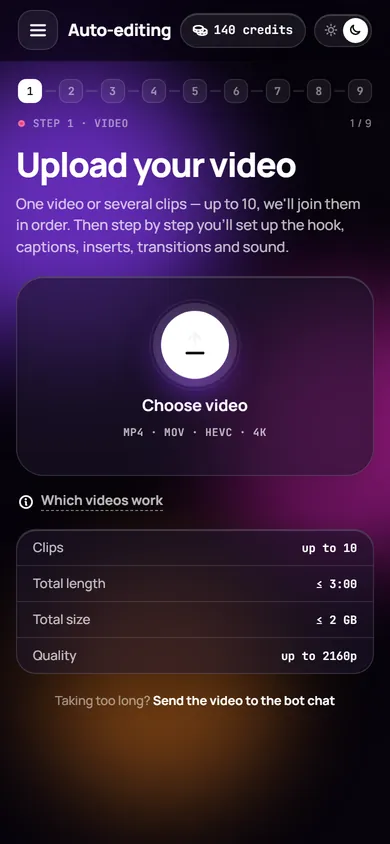
How it looks in the mini app
YouTube Shorts requirements
| Parameter | Shorts | Editing in the bot |
|---|---|---|
| Format | Vertical or square | Vertical 9:16 |
| Length | Up to 3 minutes | Up to 3 minutes of source footage, shorter after cleanup |
| First seconds | Decide retention | A large on-screen hook |
| Sound | Many people watch on mute | Word-by-word captions |
Note: if your Short is longer than a minute and contains someone else's content with an active copyright claim, YouTube may restrict where it's shown. Edit your own recordings and you won't run into this.
How to edit a Short
- Open the bot in Telegram and tap "Editing".
- Upload your footage — as one file or several clips. If you have a long video for your channel, cut a segment of up to 3 minutes from it or use split video into clips.
- Set up the hook, captions, inserts, transitions, camera, effects and sound — the preview shows the result instantly.
- Tap "Edit" and upload the finished video to YouTube via the app or YouTube Studio.
Rutube, Dzen and VK Clips
Short vertical videos aren't just a YouTube thing. The same 9:16 video works for Rutube shorts, Dzen videos and VK Clips — they all use the same format. Burned-in captions are especially useful on VK Clips, where videos are often watched on mute in the feed.
Example: a Short before and after editing
| Raw recording | Finished Short | |
|---|---|---|
| Length | 2:40 | 1:52 — within 3 minutes |
| Pauses and slips | About 40 seconds | Cut |
| Opening | A greeting and an intro sequence | Straight to the on-screen hook |
| Text | None | Word-by-word captions |
| Inserts | None | Counters and lists that match what you say, a "Subscribe" badge |
These numbers are just an example: every recording has its own number of pauses.
Common Shorts mistakes
- Someone else's music in a long Short. If a Short is longer than a minute and has a Content ID claim, YouTube will block it. Use your own voice and music that rights holders won't claim.
- An intro at the start. A logo and intro eat up the first seconds — exactly what viewers see before they swipe.
- A horizontal video. Shorts are vertical or square only; convert horizontal footage to 9:16.
- A promise with no payoff. The hook should honestly lead into the content, or viewers leave and retention drops.
- No link to your channel. In a Short's settings you can add a related video — that's how viewers move on to your long videos.
Editing one Short costs 20 credits, less on bigger packs.
FAQ
Can I edit a regular YouTube video?
The bot edits short vertical 9:16 videos — Shorts, Reels, TikTok. It doesn't edit long horizontal videos for your channel, but you can cut segments from them to make Shorts.
Is this an AI video editor?
Yes, AI transcribes your speech, cuts pauses and repeated takes, and places captions and inserts based on what you say.
Do I need desktop software?
No, editing works in Telegram — on your phone and on your computer.
Where else can I post the video?
Reels, TikTok, VK Clips, Rutube and Dzen — the format fits them all. More: Reels editing, TikTok video editing.
Can I try it for free?
Yes: your first edit is free (with a UNIQ watermark).