Merge Videos Online
Need to combine several videos into one — takes, stories, footage from different cameras? Upload them to the bot in order: it merges the clips into a single file, fits different sizes into one frame and evens out the sound. No software and no manual editing needed.
What Merge can do
- Up to 10 videos at once — in the order you uploaded them. Mixed them up? Remove a video and upload it again.
- Different sizes and orientations. Vertical, horizontal and square clips are fitted into one frame with a blurred background — no black holes and no stretching.
- Your choice of format: like the first video, vertical 9:16 for Reels, TikTok and Shorts, or horizontal 16:9 for YouTube.
- Smooth sound. If one of the clips has no audio, there will be silence in its place — the sound of the other clips won't drift out of sync.
- Quality — high resolution (at least 1080 on the short side), and the file arrives without Telegram's recompression.
How it looks in the mini app
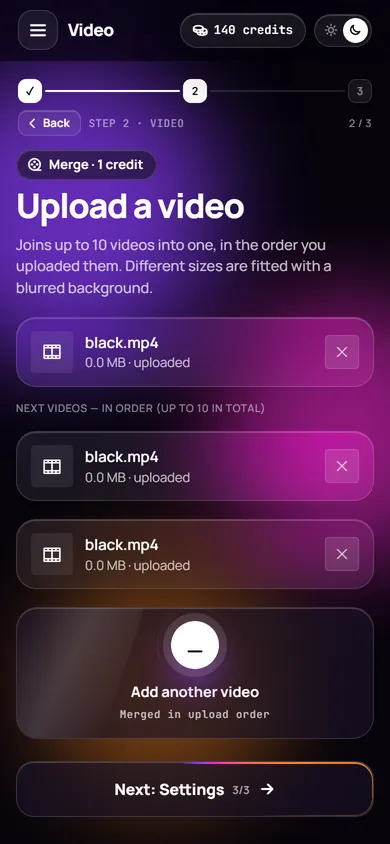
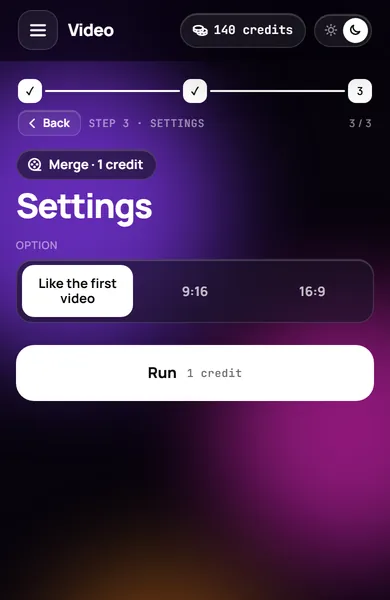
How to combine videos into one
- Open the bot in Telegram and, in the mini app, go to "Video" → "Merge".
- Upload the first video, then add the rest — you can select several files at once.
- Choose a format: "Like the first video", 9:16 or 16:9.
- Tap "Run" — the merged video arrives in the chat as a file.
Merge or auto-editing?
| Merge | Auto-editing | |
|---|---|---|
| What it does | Joins clips as they are, in order | Assembles the pieces, cuts pauses and bad takes, adds captions, a hook and inserts |
| Which videos | Any: with or without speech | Videos where you talk to the camera |
| Price | 1 credit | 20 credits |
If you're merging takes of the same recording with speech, try auto-editing: it doesn't just join the pieces — it removes everything unnecessary and styles the video.
When it comes in handy
- Combine several stories or clips into one video for Reels, TikTok or VK Clips.
- Join two videos — for example, "before" and "after", or a question and an answer.
- Stitch together a recording your phone split into parts, or footage from different cameras.
- Make a compilation of moments from several videos.
FAQ
Can I merge videos for free?
Merge costs 1 credit per video, no matter how many clips it contains. You can try the bot for free: your first edit (with a UNIQ watermark) and first uniquified video are free.
How many videos can I combine?
Up to 10 videos at once, up to 30 minutes in total.
Can I combine a vertical and a horizontal video?
Yes. A video with a different orientation is fitted into the frame in full, and the margins are filled with a blurred copy of the same video.
Can I merge videos on my phone?
Yes, the bot works in Telegram on iPhone and Android, and you upload videos straight from your gallery.
Can I combine videos with music?
Merge keeps the original sound of the videos. You can add your own background music under speech with auto-editing.