TikTok Video Editing
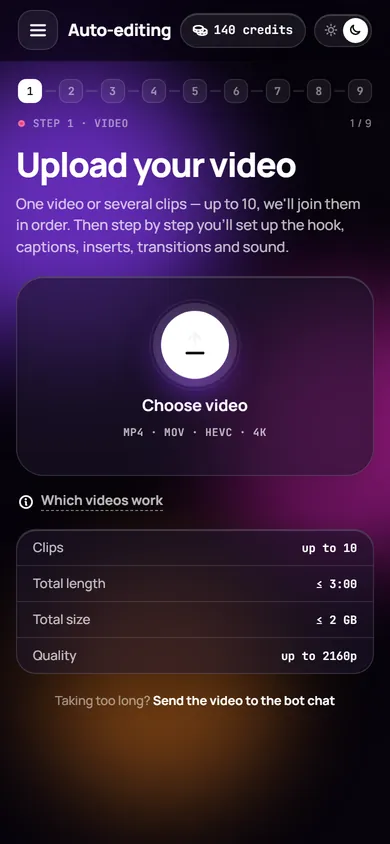
On TikTok, the first seconds and the pace decide everything. The bot edits your video for you: it cuts pauses and failed takes, adds a hook and captions, and drops in inserts, transitions and sounds on key moments. All that's left is to post it.
Why your TikTok video needs editing
The TikTok algorithm pushes a video further when people watch it to the end. A raw recording full of pauses and repeats loses viewers by the third second. Editing does three jobs: cut everything unnecessary, grab attention at the start and hold it to the end — and the bot does all of that automatically.
- A fast pace with no gaps. Pauses and silence between phrases are cut, and only the best of any repeated takes stays.
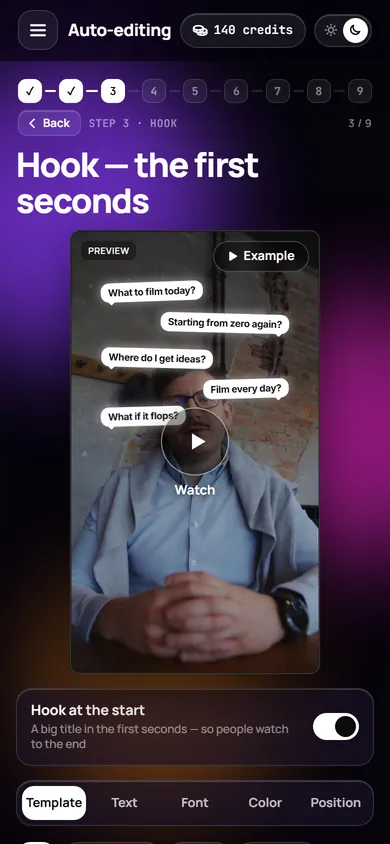
- An on-screen hook. Your first line appears large at the start — the thing that makes viewers stop scrolling.
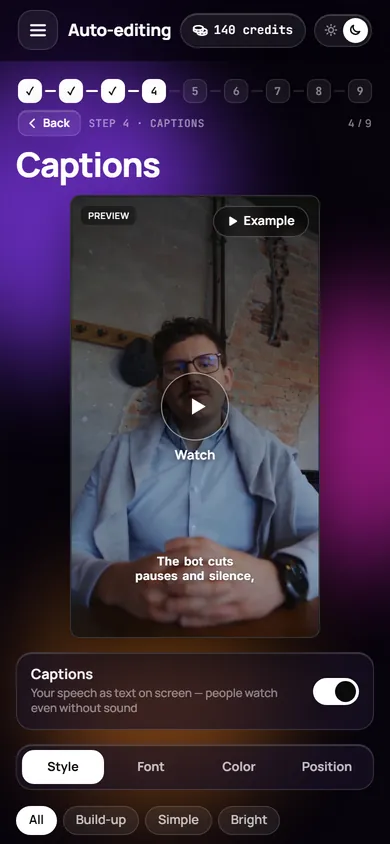
- Word-by-word captions. Words appear the moment they're spoken, so the video makes sense even on mute.
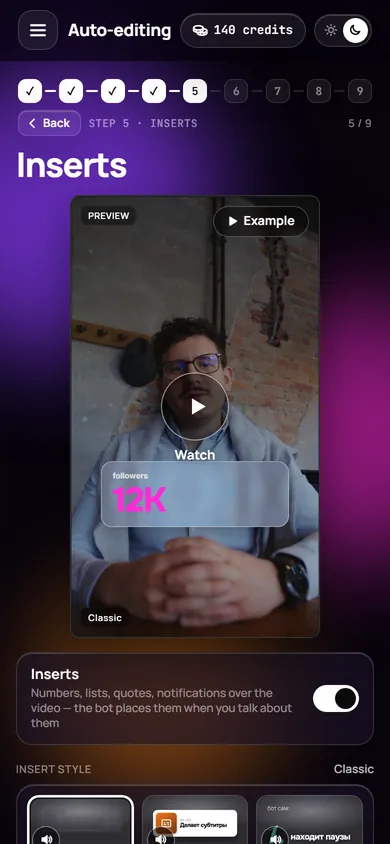
- Energy. Zooms, shot changes, transitions and short sounds on key words.
How it looks in the mini app
TikTok's built-in auto-edit vs. editing in the bot
TikTok has its own auto-edit feature: it cuts clips to the beat of a song. That's handy for videos without speech — travel, compilations, mood videos. If you talk to the camera, you need a different kind of editing — one based on speech: remove pauses, slips and repeated takes, and sync captions precisely to your words. That's what the bot does.
| TikTok auto-edit | Editing in the bot | |
|---|---|---|
| Best for | Clips set to music | Videos where you talk to the camera |
| Pauses and bad takes | Not removed | Cut automatically |
| Captions | Separate, need manual checking | Word by word, in your chosen style |
| Hook and inserts | None | Based on what you say |
How to edit a video for TikTok
- Open the bot in Telegram and tap "Editing".
- Upload your video — one file or several clips, up to 3 minutes of source footage.
- Set up the hook, captions, inserts, transitions, camera, effects and sound — every change shows up in the preview.
- Tap "Edit". The finished 9:16 video arrives in the chat — upload it to TikTok.
Tip: when you upload the video to TikTok, don't add another layer of captions on top — they're already in the video, and doubled text is distracting.
TikTok video requirements
- Format — vertical 9:16, 1080×1920. That's exactly what the bot delivers.
- Length — short videos are usually 15–60 seconds, but TikTok accepts longer ones too. The bot takes up to 3 minutes of source footage; after pause removal, the video gets shorter.
- Keep text away from the edges: buttons sit on the right and the caption at the bottom. Captions and inserts from the bot keep a safe margin, and captions can be moved to the top of the frame if the caption at the bottom gets in the way.
Example: a TikTok video before and after
| Raw recording | Finished video | |
|---|---|---|
| Length | 0:58 | 0:34 |
| First seconds | "Okay, so, basically…" | A large hook: "3 mistakes that…" |
| Pauses | 14 seconds | Cut |
| Captions | None | Word by word, key words highlighted |
| Energy | One static shot | Zooms on key moments, transitions, short sounds |
These numbers are just an example: the result depends on how many pauses and repeats your recording has.
Common TikTok mistakes
- A slow start. In the For You feed, people decide in a second or two — open with your strongest line.
- A track drowning out your voice. If you add a trending sound in TikTok itself, turn its volume down so your speech can be heard.
- Text in the button zone. Likes and comments sit on the right, the description and sound at the bottom. Keep text in the center of the frame.
- Reuploads and other people's videos. TikTok is less likely to recommend unoriginal and reposted content — film your own. More in the article "TikTok shadowban".
- No call to action. Tell viewers at the end what to do: follow, comment a word, visit your profile.
Editing one video costs 20 credits, less on bigger packs.
FAQ
Do I need to download an app to edit TikTok videos?
No, editing works inside Telegram — on your phone or computer.
What videos work?
Videos where you talk to the camera: tips, reviews, stories, expert and sales content. The bot edits based on speech, so it can't edit videos without any.
Can I post the same video to Reels and Shorts?
Yes, the format is the same. If you post one video in several places, keep each platform's rules on reposted content in mind; for Reels, see Reels editing.
Can I try it for free?
Yes: your first edit is free (with a UNIQ watermark).