Video to Circle for Telegram
Send the bot any video and it turns it into a Telegram video message (circle) that you can forward to a channel or chat, or save. No need to re-record: a clip from your gallery, your camera or a finished edit will do.
What makes our circles different
- Still round after you save it. A regular Telegram round video is actually a square video that the app simply displays as a circle: save it to your gallery and you get a square. We burn the circle into the frame itself, so the saved file is round too.
- Your choice of background. The corners around the circle can be black, white or green. Green is easy to remove with chroma key in any editor, so you can lay the circle over another video.
- Long videos become several circles. Telegram limits a video message to one minute, so the bot cuts a longer video into one-minute circles (up to 10) and sends them one after another.
How it looks in the mini app
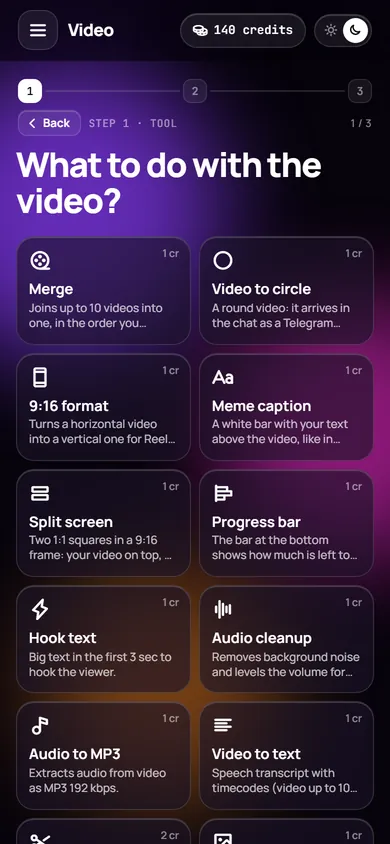
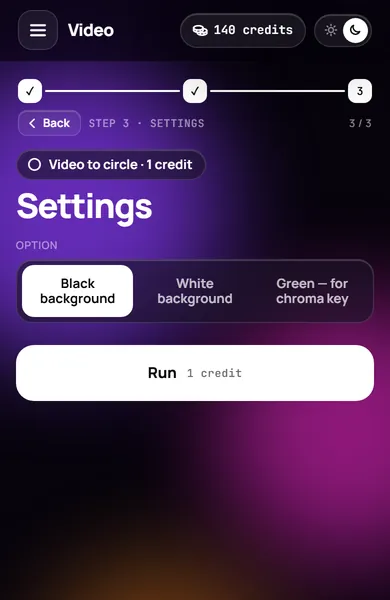
How to turn a video into a circle
- Open the bot in Telegram and, in the mini app, go to "Video" → "Video to circle".
- Upload a video from your gallery.
- Choose the background around the circle: "Black background", "White background" or "Green — for chroma key".
- Tap "Run" — the bot sends the finished circles to the chat. Forward them wherever you like: they go out as regular video messages.
Things to keep in mind
- Framing. The circle is cut from the center of the frame. Keep the important part of the video in the middle, especially with horizontal clips.
- Size. The finished circle is 640×640, the Telegram standard, so it looks sharp in the chat.
- Sound is kept exactly as in the original video.
Why send a video as a circle
People watch Telegram round videos more willingly than regular videos: they play right in the feed, feel like a personal message and stand out among posts. Channels use them for announcements and short addresses, sellers for product reviews, experts for answering questions. A round file is useful outside Telegram too — for example, as a "talking head" overlay in the corner of another video.
FAQ
Can I make a circle from a video longer than a minute?
Yes. The bot cuts the video into one-minute circles — up to 10 of them, so videos up to 10 minutes long. The circles arrive in the chat in order.
Why is a saved Telegram circle usually square?
Telegram stores video messages as square videos and only displays them as circles. We burn the circle into the frame, so the video stays round even after saving, with your chosen background color in the corners.
Is this a Telegram bot that turns videos into circles?
Yes, everything happens in Telegram: the bot opens a mini app inside Telegram, and the circles arrive in the same chat.
Can I post a circle to a channel?
Yes. You can forward the finished circle to any chat or channel where you're allowed to post.
How much does it cost?
1 credit per video, no matter how many circles it produces. You can try the bot for free: your first edit (with a UNIQ watermark) and first uniquified video are free.